

About FreeCell Solitaire
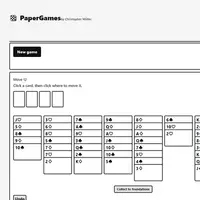
FreeCell Solitaire deals the whole deck face up into eight columns, so you can see every card from the start. Your goal is to move all 52 cards to the four foundations, one pile per suit, building from Ace up to King. In the columns, you stack cards in descending order with alternating colors. This version was built by Christopher Müller.
The key tools are the four free cells, each able to hold one card while you dig for the cards you need. How many cards you can move as a group depends on how many free cells and empty columns are open, so filling them up too fast can leave you stuck. Because nothing is hidden, nearly every deal can be solved with careful planning. Undo lets you back out of a mistake, and Collect to foundations sends every playable card home. It suits anyone who likes calm, logical puzzles.
How to play FreeCell Solitaire
- Click or tap a card - select a card, run or free-cell card
- Click or tap a column, empty free cell or foundation - move the selection
- Tab to a card or target, then Enter or Space - keyboard play
- Collect to foundations - send every playable card home
- Undo - take back a move
- New game - start a new deal (under Menu if hidden)
Playing FreeCell Solitaire on a computer
Click a card or a run to select it, then click a column, an empty free cell or the matching foundation to move it there. You can also Tab to a card and press Enter or Space. Click Undo to take back a move. Before you park a card in a free cell, check that you have a plan to move it out again.
Playing FreeCell Solitaire on a phone or tablet
FreeCell Solitaire works with touch. Tap a card or run to select it, then tap the column, free cell or foundation where it should go. Undo, New game and Collect to foundations are tap buttons too. The layout adjusts to the screen, and turning your phone sideways gives the eight columns more room.
Tips and tricks
- Look for the Aces and low cards buried deep in columns first, and plan how to free them.
- Try to keep at least one free cell open; a full set of free cells limits how many cards you can move at once.
- An empty column is worth more than a free cell, because it lets you move longer runs.
- Use Undo to test a line of moves and step back if it leads nowhere.
Game details
| Developer | Christopher Müller |
|---|---|
| Category | Card & Board Puzzle |
| Platform | Desktop and mobile |
| Technology | HTML5 (open source) |
| Price | Free |
| Original game | YourChaosChris/PaperGames by Christopher Müller |
| Code license | MIT |
| Art and sound | MIT (cards drawn in code with text ranks and inline SVG suits; no image or audio files) |
| Hosted copy | Adapted to run on GN Math - see the changes |
FreeCell Solitaire FAQ
Can every FreeCell deal be won?
Nearly all of them. The deals are random shuffles, and almost every possible deal has a solution, though a very rare one may not.
Does FreeCell Solitaire save my game?
Yes, the game in progress is saved in your browser, so you can close the page and continue later on the same device.
Can I play FreeCell Solitaire on a phone or Chromebook?
Yes. Tap a card, then tap where it should go; on a Chromebook you can click or use Tab and Enter.