
About Universal Reversi
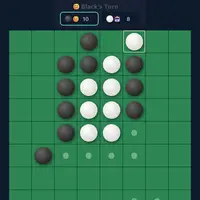
Universal Reversi is a version of the classic disc-flipping game, built by Norbert Nopper. Black and White take turns placing discs. A move has to trap one or more of your opponent's discs in a straight line between your new disc and one you already have, and every trapped disc flips to your color. When neither player can move, whoever has the most discs wins.
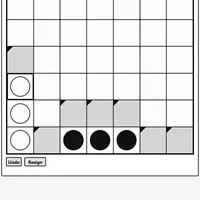
The twist is the board itself. Its edges wrap around, so a line that runs off one side continues on the other, and corners are not the safe spots they usually are. Arrow keys or the PAN buttons shift the view so you can see lines that cross the edge. You can play against a computer on five difficulty levels, play a friend on the same device, or watch two computer players. Board sizes range from 6x6 to 10x10. It suits board game fans who want a familiar game with a fresh puzzle.
How to play Universal Reversi
- Click or tap a cell marked with a dot - place a disc
- Arrow keys or the PAN buttons - shift the view of the board
- Reset Game - start a new game and apply settings
- Game Settings panel - change players, starting color, board size or difficulty
Playing Universal Reversi on a computer
By default you play Black against the computer. Click any cell marked with a dot to place a disc and flip the trapped pieces. Use the arrow keys or the PAN buttons to shift the board and see lines that wrap around the edges. Change players, board size or difficulty in Game Settings, then press Reset Game to apply them.
Playing Universal Reversi on a phone or tablet
Universal Reversi works well on a phone. Tap a dotted cell to place a disc, and tap the PAN arrows to shift the board. The board fits the width of the screen when you hold your phone upright. The Game Settings panel sits below the board, so scroll down inside the game to change players or difficulty.
Tips and tricks
- Remember that lines wrap around the edges; pan the board to check flips that cross a side.
- Do not grab the most discs early. Having more moves available later matters more.
- Start on Very Easy or Easy to get used to the wrapping board before moving to Hard.
- Keep the allowed-moves dots on while you learn so you can see every legal play.
Game details
| Developer | Norbert Nopper |
|---|---|
| Category | Card & Board Strategy 2 Player |
| Platform | Desktop and mobile |
| Technology | HTML5 (open source) |
| Price | Free |
| Original game | McNopper/UniversalReversi by Norbert Nopper |
| Code license | MIT |
| Art and sound | MIT (board and discs drawn with CSS, no image or audio files) |
| Hosted copy | Adapted to run on GN Math - see the changes |
Universal Reversi FAQ
Can two people play Universal Reversi?
Yes. Set Players to Human vs Human in Game Settings and press Reset Game, then take turns on the same device.
What happens if I have no legal move?
Your turn is skipped and your opponent plays again. The game ends when neither player can move.
Why does the board wrap around?
This version treats the board as having no edges, so lines continue from one side to the other. It changes which squares are strong and makes old habits less reliable.