
About Snakes and Ladders
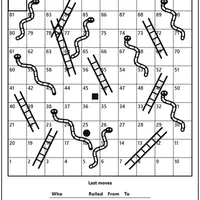
Snakes and Ladders is a digital take on the classic family board game, made by Christopher Müller. Each player has a token that starts off the board. On your turn you roll one die and move forward that many squares. Land at the bottom of a ladder and you climb straight up; land on a snake's head and you slide back down. The first token to reach the final square wins.
Before each game you choose the setup. There is a full 100-square board and a smaller 50-square board meant for young children. You can pick whether spare pips are simply lost at the finish or whether you must land exactly on the last square. Two to four players can join, with zero to three of them played by the computer, and you decide who goes first. A list of recent moves shows every roll. Because it is pure luck, it suits families, younger kids and anyone wanting a relaxed game together.
How to play Snakes and Ladders
- Click or tap Roll - roll the die and move
- Click or tap Continue - let a computer player take its turn
- Choose board, finish rule, players, computers and who starts, then New game - set up a match
- Click or tap Menu - show the setup again during a game
Playing Snakes and Ladders on a computer
Choose the board size, finish rule, number of players, how many are computers and who starts, then click New game. Click Roll on your turn to move your token, and click Continue to let a computer player go. Ladders carry you up and snakes send you down. Click Menu at any time to see the setup options again for the next match.
Playing Snakes and Ladders on a phone or tablet
Snakes and Ladders works well on phones and tablets. Tap Roll to throw the die, tap Continue for computer turns, and tap Menu to change the setup. The board fits best with your phone held upright. For family game night, set the computer players to zero and pass the device around so everyone takes a turn.
Tips and tricks
- Pick the exact-finish rule for a longer, more suspenseful ending; spare pips lost makes games shorter.
- Use the 50-square board for quick rounds or when playing with small children.
- Set computer moves to Automatically if you want the game to run without tapping Continue.
- Check the Last moves list to see who climbed ladders and who slid down snakes.
Game details
| Developer | Christopher Müller |
|---|---|
| Category | Card & Board 2 Player Casual |
| Platform | Desktop and mobile |
| Technology | HTML5 (open source) |
| Price | Free |
| Original game | YourChaosChris/PaperGames by Christopher Müller |
| Code license | MIT |
| Art and sound | MIT (board, snakes and ladders drawn with SVG and CSS, no image or audio files) |
| Hosted copy | Adapted to run on GN Math - see the changes |
Snakes and Ladders FAQ
Can friends play Snakes and Ladders on one device?
Yes. Set Players to 2, 3 or 4 and Computer to 0, then take turns tapping Roll on the same screen.
Does the game remember a match in progress?
Yes. An unfinished game is saved in your browser and comes back when you reopen the page on the same device.
Do I need to roll an exact number to win?
Only if you choose the Exactly onto the last field rule. With the other rule, any roll that reaches the end wins.