
About Fleet Strike
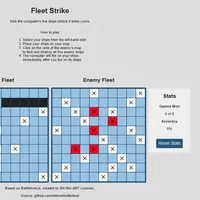
Fleet Strike is a single-player take on the classic pencil-and-paper naval game, built by Bill Mei. You and the computer each hide five ships, from a small patrol boat to an aircraft carrier, on separate 10x10 grids. The goal is to find and sink all five enemy ships before the computer sinks yours.
First you place your fleet, either one ship at a time with an option to rotate, or all at once with a random layout. Then you click squares on the enemy grid to fire. Each shot marks a hit or a miss, and the computer fires back right after you. The computer is not just guessing at random; it aims by working out where ships are most likely to be, so careless play gets punished. A stats panel keeps your games won and shot accuracy. It is a calm, thinking game that suits anyone who likes deduction and a little luck.
How to play Fleet Strike
- Click a ship's name in the list - pick it to place
- Click "Rotate Ship" - turn it before placing
- Click a square on Your Fleet - place the ship
- Click a square on Enemy Fleet - fire a shot
- Tap the same buttons and squares - all actions work by touch
- Click "Restart Game" - play again after a game ends
Playing Fleet Strike on a computer
Click a ship name on the left, use Rotate Ship if you want it vertical, then click a square on Your Fleet to place it; a preview shows where it will go. After all five are down, click squares on the Enemy Fleet grid to fire. Hits and misses are marked as you go. Start by spacing your shots apart instead of firing at neighboring squares.
Playing Fleet Strike on a phone or tablet
You can tap ship names, the Rotate Ship button and grid squares on a touch screen, so a full game is possible. The layout is wide, though, and it shrinks to fit a phone, which makes the grid squares small and easy to miss with a finger. Hold the device sideways, or use a tablet or Chromebook for a more comfortable game.
On a phone right now? Try Klondike Solitaire, Spider Solitaire and Checkers - they are built for touch screens.
Tips and tricks
- After a hit, fire at the squares directly next to it to find which way the ship runs.
- When hunting, spread shots in a checkerboard pattern; every ship covers at least two squares, so you never need to test every square.
- Avoid lining all your ships up along one edge, since the computer looks for likely patterns.
- Use Place Randomly and Start when you want a fresh layout without thinking about it.
Game details
| Developer | Bill Mei |
|---|---|
| Category | Card & Board Strategy |
| Platform | Desktop (needs a keyboard or mouse) |
| Technology | HTML5 (open source) |
| Price | Free |
| Original game | billmei/battleboat by Bill Mei |
| Code license | MIT |
| Art and sound | MIT (author's own small marker icons; grids drawn with CSS, no audio) |
| Hosted copy | Adapted to run on GN Math - see the changes |
Fleet Strike FAQ
How do you win Fleet Strike?
Sink all five of the computer's ships before it sinks all of yours. A pop-up message announces the winner.
Does it save my stats?
Yes. Games won and shooting accuracy are stored in your browser, and the Reset Stats button clears them.
Can two people play?
No. Fleet Strike is one player against the computer.