


About IsoCity
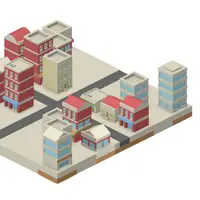
IsoCity is a tiny isometric city builder made by Victor Ribeiro. There is no money, no score and no goal to reach. You get a small square plot of land seen at an angle and a palette full of tiles, including straight and curved roads, crosswalks, tree-lined streets, water channels, low walls and many kinds of buildings, all drawn by the artist Kenney. Pick a tile, place it on the map, and slowly shape a little neighborhood.
Because nothing is timed or scored, the fun is in the design. You can line streets with houses, run a canal through the middle or build a dense downtown block, then erase squares and try something different. Holding the mouse button and dragging paints the same tile across several squares quickly. Your city is saved in the browser, so it is still there when you come back. It suits anyone who likes calm building, decorating or planning without pressure.
How to play IsoCity
- Click a tile in the palette - choose it (scroll the palette for more)
- Click a square on the map - place the tile
- Hold the mouse button and drag - paint the tile across several squares
- Right-click a square - clear it back to ground
- Tap a palette tile, then tap a square - build on a touch screen
Playing IsoCity on a computer
Click a tile in the palette on the side to choose it, scrolling down for more options. Then click a square on the map to place it, or hold the mouse button and drag to paint a line of the same tile. Right-click any square to clear it. A simple way to start is a cross of roads through the middle, then houses along each road.
Playing IsoCity on a phone or tablet
IsoCity works with touch. Tap a tile in the palette to select it, then tap a square on the map to place it. To erase, choose the plain ground tile at the start of the palette and tap the square you want to clear. Turning your phone sideways gives the map more room. Your town is saved in the browser.
Tips and tricks
- Lay out roads first, then fill the blocks between them with buildings.
- Use click-and-drag to paint a straight road or a row of the same building in one motion.
- Tall buildings can hide the squares behind them, so build from the back of the map toward the front.
- On touch screens, the first tile in the palette is plain ground; use it to erase a square.
Game details
| Developer | Victor Ribeiro |
|---|---|
| Category | Strategy Sandbox Casual |
| Platform | Desktop and mobile |
| Technology | HTML5 (open source) |
| Price | Free |
| Original game | victorqribeiro/isocity by Victor Ribeiro |
| Code license | MIT |
| Art and sound | CC0 (isometric city and building tiles by Kenney, kenney.nl) |
| Hosted copy | Adapted to run on GN Math - see the changes |
IsoCity FAQ
Is there a goal in IsoCity?
No. It is a free-building sandbox with no budget, score or timer, so you build whatever you like.
Does IsoCity save my city?
Yes. Your map is saved in your browser and loads again the next time you open the game on the same device.
Does IsoCity work on phones?
Yes. Tap a tile in the palette and then tap a square on the map to place it.