
About Color Tile Match
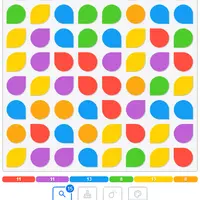
Color Tile Match is a match-three puzzle built by Alexander Bazhanov. The board is a grid of colored tiles, and you swap two neighbors to make a row or column of three or more in the same color. Matched tiles clear away and new ones drop in. Bigger matches earn more points, and points add seconds back to a two-minute timer.
The game ends when the clock runs out or when no moves are left on the board. A magnifier button highlights one possible move, and a small badge shows how many moves exist right now. As your score grows you earn boosters: one removes every tile of a chosen color, one clears a tile and everything around it, and one turns a tile into a joker that matches any color. Your best score is saved in the browser. It suits players who like quick, colorful puzzles with a bit of time pressure.
How to play Color Tile Match
- Click a tile, then a neighbor - swap them
- Drag a tile onto a neighbor - swap with one motion
- Tap or slide on a touch screen - same as clicking or dragging
- Magnifier button - highlight a possible move
- Brush, bomb or palette button - use a booster on the selected tile
- Circular arrow button - start a new game
Playing Color Tile Match on a computer
Click a tile and then a tile next to it to swap them, or drag one tile onto its neighbor. Three or more of one color in a line will clear. Use the magnifier if you are stuck, and the brush, bomb or palette buttons once you have boosters. A good habit is to scan the lower rows first, because clearing there can set off extra matches as tiles fall.
Playing Color Tile Match on a phone or tablet
Color Tile Match is built for touch. Tap one tile and then a neighbor, or slide a tile straight onto the one beside it. The board is tall, so holding your phone upright shows everything, including the booster buttons. Tap FAQ to pause and read the rules. Your best score stays saved in the browser on your device.
Tips and tricks
- Look for chances to match four or five tiles at once, since larger matches give more points and more time.
- Check the move-count badge often; if it is getting low, use a booster before the board locks up.
- Save the color-clearing booster for the color that covers the most squares.
- Opening the FAQ pauses the timer, so read the rules there without losing time.
Game details
| Developer | Alexander Bazhanov |
|---|---|
| Category | Puzzle Casual |
| Platform | Desktop and mobile |
| Technology | HTML5 (open source) |
| Price | Free |
| Original game | bazhanius/match-3-game by Alexander Bazhanov |
| Code license | MIT |
| Art and sound | MIT (tiles drawn on canvas, inline SVG icons from Material Symbols under Apache-2.0, no audio) |
| Hosted copy | Adapted to run on GN Math - see the changes |
Color Tile Match FAQ
How does the timer work?
You start with two minutes, and the points you score add time back. The game ends when time runs out or no moves are left.
How do I get boosters?
They are earned by score: the joker booster every 250 points, the area booster every 500 points and the color-clearing booster every 1000 points.
Does Color Tile Match work on phones?
Yes. You can tap two tiles or slide one tile onto a neighbor, and the tall layout fits a phone held upright.