
About Black Hole Square
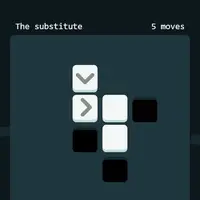
Black Hole Square is a small, quiet puzzle game built by Quinten Clause. Each screen is a 6 by 6 grid holding a black hole and a scattering of other squares. Your job is to clean up the universe: get rid of every square except the black holes, using no more moves than the counter allows. There are 18 puzzles in all, and the three bonus puzzles are already unlocked here.
Every piece reacts differently when you tap it. An arrow pushes itself and the pieces in front of it in the direction it points, and anything shoved into a black hole vanishes. An X square simply pops. A star collapses into a brand-new black hole, which changes where pieces can be pushed. If you run out of moves, get stuck or leave pieces behind, the puzzle resets so you can try a different order. It suits players who like short brain teasers with no timer and no pressure.
How to play Black Hole Square
- Click or tap a tile - push a row (arrow), pop an X or collapse a star
- Drag left or swipe left - skip to the next screen
- Drag right or swipe right - reset the puzzle, or go back if you have not moved yet
- Click or tap a square in the progress row - jump to any puzzle
- Sideways trackpad scroll - same as dragging left or right
Playing Black Hole Square on a computer
Click any tile on the grid to use it: arrows push a row of pieces, X squares pop and stars turn into black holes. Drag left across the board to skip ahead, or drag right to reset the puzzle you are on. A sideways scroll on a trackpad does the same thing. Look at the move counter before you click and plan every step, because one wasted tap usually means starting over.
Playing Black Hole Square on a phone or tablet
Black Hole Square works well on phones and tablets, and the board fits a screen held upright. Tap a tile to use it, swipe left to skip to the next screen and swipe right to reset. Tap a square in the progress row under the board to jump straight to any puzzle. Sound starts only after your first tap, so you can lower your volume before you begin.
Tips and tricks
- Read the move counter first. It is a hard limit, so plan the whole solution before your first tap.
- An arrow moves along with the pieces it pushes, so check where it will end up before you tap it.
- Tap a star only when you want a new black hole in that exact spot, since pieces can later be pushed into it.
- When a plan clearly fails, drag or swipe right to reset right away. Retrying costs nothing.
Game details
| Developer | Quinten Clause |
|---|---|
| Category | Puzzle Casual |
| Platform | Desktop and mobile |
| Technology | HTML5 (open source) |
| Price | Free |
| Original game | Quinten/black-hole-square by Quinten Clause |
| Code license | MIT |
| Art and sound | MIT (shapes drawn in code, sound made with Web Audio tones) |
| Hosted copy | Adapted to run on GN Math - see the changes |
Black Hole Square FAQ
How do I finish a puzzle in Black Hole Square?
Remove every square except the black holes before your moves run out. When the board is empty, the game shows 'Clean!' and moves on to the next screen.
Does Black Hole Square save my progress?
Yes. Solved puzzles are stored in your browser, and the progress row under the board lets you jump to any puzzle. Clearing site data or using a private window erases it.
Can I play Black Hole Square on a phone?
Yes. It was designed for touch, with taps for tiles and swipes to skip or reset. It works just as well with a mouse on a Chromebook or laptop.