
About Mini Putt Park
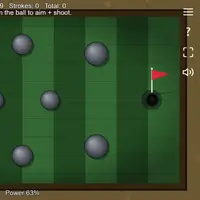
Mini Putt Park is a nine-hole mini golf course built by Frank Force. Each hole has its own layout, from a gentle opening curve to a hole full of pinball-style bumpers, narrow corridors, dogleg bank shots, an S-shaped snake path and a final hole with a moving blocker. The goal is to finish the full course in as few strokes as possible.
You aim by pressing on the ball and dragging toward where you want it to go, and the farther you drag the harder you putt, with a power percentage shown on screen. The ball bounces off walls and obstacles with real physics, so angles matter. Rolling over the cup too fast means it will not drop, so speed control is as important as aim. The top of the screen shows strokes for the hole and your running total. A course map lets you pick any hole to practice. It is relaxed enough for anyone, with enough angles to keep careful players busy.
How to play Mini Putt Park
- Click or tap a hole preview, or press 1 to 9 - pick a hole on the course map
- Press on the ball and drag toward the target - aim and set power
- Release the mouse button or lift your finger - putt
- R - replay the current hole
- N - skip to the next hole
- Esc or the menu icon (top right) - back to the course map
Playing Mini Putt Park on a computer
Pick a hole on the course map by clicking its preview or pressing a number key from 1 to 9. Press on the ball, drag toward where it should go, and release to putt; the farther you drag, the more power you use. Press R to replay a hole, N to skip ahead and Esc to return to the map. Use gentle putts near the cup.
Playing Mini Putt Park on a phone or tablet
Touch controls work well. Tap a hole preview on the course map, then touch the ball and drag toward your target, and lift your finger to putt. The game is locked to landscape on touch devices, so turn your phone sideways when it shows the rotate prompt. Tap the menu icon in the top right corner to go back to the course map.
Tips and tricks
- Do not drag to full power every time; a ball moving too fast rolls right over the cup.
- On the bumper and corner holes, plan a bank shot off a wall instead of trying to go straight.
- On the last hole, watch the moving blocker for a cycle and putt just as the gap opens.
- Use R to retry a hole you want to practice, but remember strokes keep adding to your total.
Game details
| Developer | Frank Force |
|---|---|
| Category | Sports Puzzle Casual |
| Platform | Desktop and mobile |
| Technology | HTML5 (open source) |
| Price | Free |
| Original game | KilledByAPixel/LittleJSArcade by Frank Force |
| Code license | MIT |
| Art and sound | MIT (course art drawn in code, sound effects generated in code); Box2D physics under the zlib license |
| Hosted copy | Adapted to run on GN Math - see the changes |
Mini Putt Park FAQ
How is Mini Putt Park scored?
Every putt counts as one stroke. The goal is the lowest total across all nine holes, and your best full-course total is stored in your browser.
How many holes are there?
There are nine holes, each with a different layout, and you can start any of them from the course map.
Does it work on phones?
Yes. Touch the ball, drag toward your target and lift your finger to putt. The game asks you to turn your phone sideways.