About Backyard Slugger
Backyard Slugger puts you at home plate with a bat and nothing else to worry about. A pitcher throws from the mound, and your only job is to swing at the right moment. Built by Frank Force, the game tracks your hits, perfect hits, home runs and the longest ball you have launched in a session.
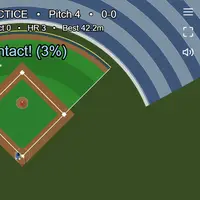
Each pitch is either a strike over the plate or a ball outside the zone. Swing and miss, or take a strike, and the count climbs; three strikes is an out and four balls is a walk, then the count resets. When you connect, the game rates the contact as a percentage. Weak contact rolls into play, a solid hit carries farther, and a sweet-spot swing above 90 percent can fly over the fence. Balls that land outside the foul lines are called foul. There is no game over, so it works well as a quick timing drill for anyone who likes baseball or just wants a relaxed one-button challenge.
How to play Backyard Slugger
- Space or left click - swing the bat
- Tap the screen - swing (touch)
- Enter - call the next pitch right away
- R - reset your session stats
- Esc or the menu icon (top right) - pause, restart or quit
Playing Backyard Slugger on a computer
Pitches start coming on their own. Press Space or click the left mouse button to swing, and press Enter if you want the next pitch without waiting. R wipes your session stats and Esc opens the pause menu. Keep your eyes on the ball as it nears the plate rather than on the pitcher, because the swing has to land at the exact moment the ball arrives.
Playing Backyard Slugger on a phone or tablet
On a phone or tablet, tap anywhere on the screen to swing, and tap the menu icon in the top right corner to pause. Swinging works fine by touch, but the camera does not adjust for small screens, so in portrait mode the score text and the edges of the outfield are clipped. Hold your device sideways for the best view.
On a phone right now? Try Coreball, 2048 and Hextris - they are built for touch screens.
Tips and tricks
- Watch the ball leave the pitcher's hand and swing as it reaches the plate; early and late swings both miss.
- Let pitches that sail wide of the zone go by, since swinging at them can add a strike.
- Contact quality decides distance, so a well-timed swing matters more than swinging hard or often.
- Press R when you want a clean start for your best-distance and home run count.
Game details
| Developer | Frank Force |
|---|---|
| Category | Sports Skill Casual |
| Platform | Desktop (needs a keyboard or mouse) |
| Technology | HTML5 (open source) |
| Price | Free |
| Original game | KilledByAPixel/LittleJSArcade by Frank Force |
| Code license | MIT |
| Art and sound | MIT (ballpark, players and ball drawn in code, sound effects generated in code); Box2D physics under the zlib license |
| Hosted copy | Adapted to run on GN Math - see the changes |
Backyard Slugger FAQ
How do you hit a home run?
Time your swing so the bat meets the ball near its sweet spot. The highest-quality hits travel fastest and can carry past the outfield fence.
Does Backyard Slugger save my stats?
No. Hits, home runs and best distance last only for the current session, and pressing R or reloading clears them.
Can I play on a phone?
Tapping the screen swings the bat, but the view does not resize for a tall phone screen, so some text and the outfield edges get cut off. Turning the phone sideways helps.