

About Typer Defense
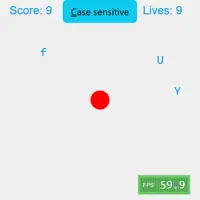
Typer Defense is a fast typing game built by Berk Erol. A red circle sits in the middle of the screen, and letters drift toward it from all directions at different speeds. Press the matching key to blow a letter apart. Each one you destroy adds a point, but pressing a key that matches nothing on screen takes a point away.
You have 10 lives. When any letter reaches the core, you lose a life and the screen clears for a fresh start. Lose all 10 and the game is over. By default the game is case sensitive, so a capital letter needs Shift while lowercase letters do not, which turns it into real practice with both hands. You can switch case sensitivity off with the button if you want a more relaxed round. It suits anyone building typing speed and accuracy, from students learning the keyboard to fast typists chasing a high score.
How to play Typer Defense
- Letter keys - destroy the matching letter
- Shift + letter - destroy an uppercase letter
- Esc - pause or resume
- Click the "Case sensitive" button - switch case sensitivity on or off
Playing Typer Defense on a computer
Letters start flying toward the red circle in the middle. Press the matching letter key to destroy each one, and hold Shift for capital letters when case sensitivity is on. Press Esc to pause and resume, and click the Case sensitive button to change that setting. Click inside the game area first so your key presses reach it, and keep your eyes on the letters nearest the center.
Playing Typer Defense on a phone or tablet
Typer Defense needs a physical keyboard. Every action is a key press, and a phone or tablet touch screen has no way to send those keys to the game, so it cannot be played by touch. If you are on a phone, try games labeled 'Desktop and mobile' instead, and come back to this one on a laptop, desktop or Chromebook.
On a phone right now? Try Coreball, 2048 and Hextris - they are built for touch screens.
Tips and tricks
- Type the letters closest to the core first, since they are the ones about to cost you a life.
- Do not mash keys; every press that matches nothing on screen lowers your score.
- Turn off case sensitivity while you warm up, then switch it back on for a real challenge.
- Keep your fingers on the home row so you can reach any letter without looking down.
Game details
| Developer | Berk Erol |
|---|---|
| Category | Casual Skill |
| Platform | Desktop (needs a keyboard or mouse) |
| Technology | HTML5 (open source) |
| Price | Free |
| Original game | berkerol/typer by Berk Erol |
| Code license | GPL-3.0 |
| Art and sound | GPL-3.0 (letters and effects drawn on canvas, no image or audio files) |
| Hosted copy | Adapted to run on GN Math - see the changes · source code |
Typer Defense FAQ
How do you lose in Typer Defense?
Each letter that reaches the red core costs one life. You start with 10, and the game ends when they are all gone.
Does it keep my high score?
No. The score resets when the game ends or the page reloads.
Can I play on a phone?
No. The game needs a physical keyboard, and touch screens do not bring up a way to type into it.