About Brick Smash
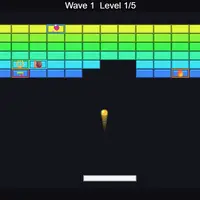
Brick Smash gives you a paddle at the bottom of the screen, a ball and a wall of colored bricks. Bounce the ball up to break bricks and keep it from falling past you. You start with three lives, and the goal is to clear all five layouts, which then repeat with a faster ball each time around. It was built by Frank Force.
Not every brick is the same. Silver bricks take two hits, gold bricks cannot be broken at all, and special bricks drop power-ups such as a wider paddle, extra balls, a sticky paddle, a laser, a fireball, slow motion or an extra life. Breaking several bricks in a row before the ball returns to your paddle builds a combo that multiplies your points. The game keeps your best score, so it works well for short sessions where you try to beat your own record.
How to play Brick Smash
- Left / Right arrows or A / D - move the paddle
- Mouse or drag on screen - move the paddle
- Space, Enter, left click or tap - launch the ball, release a stuck ball or fire the laser
- R - restart the run
- Esc - pause
Playing Brick Smash on a computer
Move the paddle with the mouse, the Left and Right arrows, or A and D. Press Space, Enter or click to launch the ball. Press Esc to pause and R to start a fresh run. When you catch the laser power-up, keep clicking or pressing Space to fire while you line up the paddle under tough bricks.
Playing Brick Smash on a phone or tablet
Brick Smash works with touch. Drag your finger left and right anywhere on the screen to move the paddle, and tap to launch the ball, let go of a stuck ball or fire the laser. Turning your phone sideways gives the wide playfield more room, which makes falling power-ups easier to see and catch.
Tips and tricks
- Aim for the special bricks first; they are the only ones that drop power-ups.
- Hit the ball with the edge of the paddle to send it at a sharper angle into gaps between gold bricks.
- With the sticky power-up, hold the ball and line up your shot before releasing it.
- Let the ball bounce around the top of the wall to build a long combo, since the multiplier resets when it touches your paddle.
Game details
| Developer | Frank Force |
|---|---|
| Category | Arcade Action Skill |
| Platform | Desktop and mobile |
| Technology | HTML5 (open source) |
| Price | Free |
| Original game | KilledByAPixel/LittleJSArcade by Frank Force |
| Code license | MIT |
| Art and sound | MIT (bricks and paddle drawn in code, sounds generated in code; power-up icons use your device's emoji font) |
| Hosted copy | Adapted to run on GN Math - see the changes |
Brick Smash FAQ
How many levels are in Brick Smash?
There are five layouts. After the fifth, the game loops back to the first with a faster ball, so a run can keep going as long as you have lives.
Does Brick Smash save my high score?
Yes, your best score is saved in your browser and shown on the title screen.
Can I play Brick Smash on a phone?
Yes. Drag your finger along the screen to move the paddle and tap to launch the ball or fire the laser.