About Sky Hop
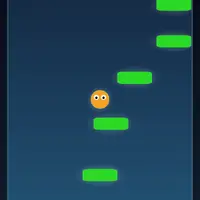
Sky Hop is an endless vertical climber built by Frank Force. There is no jump button: your ball bounces automatically every time it lands on a platform, and all you do is steer left or right. Fly off one side of the screen and you come back on the other. Your score grows with your height, and falling off the bottom ends the run.
Platforms come in a few kinds. Green ones are safe, blue ones slide back and forth, and brown ones crumble right after you bounce off them. Yellow springs launch you extra high. The start of each climb is gentle, then crumbling and moving platforms show up more often the higher you go. Your best score and two medals, one for riding a spring and one for reaching 1,000 points, are saved in your browser. It suits anyone who likes quick runs and one more try.
How to play Sky Hop
- Left and right arrows, or A and D - steer
- Drag the on-screen stick (lower left) - steer on a touch screen
- Enter twice, or click or tap Play - start a climb
- Escape or the menu icon in the top corner - pause the game
Playing Sky Hop on a computer
Press Enter twice, or click Play, to start climbing. Steer with the left and right arrow keys or A and D; the ball jumps by itself whenever it lands. Press Escape to pause. Keep your eyes on the platforms above the ball rather than the ball itself, so you always know where your next landing spot is.
Playing Sky Hop on a phone or tablet
Sky Hop works on phones and tablets held upright. Tap Play to start, then drag the on-screen stick at the lower left to steer. There is no tilt control, so you do not need to move the phone itself. The menu icon in the top corner pauses the game. Keep your thumb on the stick so you can react quickly when a platform crumbles.
Tips and tricks
- Use the screen wrap. When the next platform is far to one side, leaving through the opposite edge is often quicker.
- Never count on a brown platform twice. It falls away after one bounce, so pick your next landing early.
- Steer for yellow springs when you see them, since they give a free boost upward.
- Blue platforms slide, so aim for where the platform will be when you land, not where it is now.
Game details
| Developer | Frank Force |
|---|---|
| Category | Arcade Platformer Skill |
| Platform | Desktop and mobile |
| Technology | HTML5 (open source) |
| Price | Free |
| Original game | KilledByAPixel/LittleJSArcade by Frank Force |
| Code license | MIT |
| Art and sound | MIT (ball and platforms drawn in code from simple shapes, sound effects generated at runtime) |
| Hosted copy | Adapted to run on GN Math - see the changes |
Sky Hop FAQ
Is there a jump button in Sky Hop?
No. The ball bounces automatically whenever it lands on a platform. You only steer left and right.
Does Sky Hop save my best score?
Yes. Your best score and the two medals are stored in your browser. You can reset your best score from the options menu.
Can I play Sky Hop on a phone?
Yes. Drag the on-screen stick at the lower left to steer. It also works with a keyboard or gamepad on Chromebooks and computers.