About Strike Lane Bowling
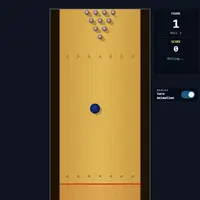
Strike Lane Bowling is a 3D bowling game made by isocialPractice. You play a full game of ten frames with standard scoring: knock down all ten pins on the first ball for a strike, clear them in two balls for a spare, and earn bonus points from the following rolls. A perfect game is 300, and the game celebrates it if you get there.
Each throw has three parts. First, slide the ball left or right along the foul line to choose your starting spot. Next, hold Space and drag the mouse down to build power. Then flick upward quickly, and drift sideways during the flick to put curve on the ball. Balls that drop into the gutter score nothing. The scorecard tracks every frame, and you can watch replays of your rolls or switch them off. It suits players who enjoy steady practice and the feeling of finally getting a hook to land in the pocket.
How to play Strike Lane Bowling
- Enter or click the lane - start or restart a game
- Move the mouse left or right - aim at the foul line
- Hold Space and drag the mouse down - charge power
- Flick the mouse up while holding Space - throw; drift sideways to hook
- Esc or let go of Space - cancel a charged throw
- Click the Turn Animation switch - turn replays on or off
Playing Strike Lane Bowling on a computer
Press Enter or click the lane to start. Move the mouse left or right to place the ball, then hold Space and drag the mouse down to charge power. Keep holding Space and flick the mouse upward to throw, drifting sideways during the flick for a hook. Press Esc to cancel a throw. On a Chromebook, a plugged-in mouse makes the flick much easier than a trackpad.
Playing Strike Lane Bowling on a phone or tablet
This game needs a keyboard and a mouse. Every throw depends on holding the Space key while dragging and flicking a mouse, and there are no touch controls, so it will not work on phones or tablets. If you are on a phone, look for games labeled 'Desktop and mobile' instead, and save this one for a laptop, desktop or Chromebook with a mouse.
On a phone right now? Try Coreball, 2048 and Word Search - they are built for touch screens.
Tips and tricks
- Start by throwing straight with medium power to learn how your starting spot changes where the ball goes.
- Add a small sideways drift during the flick; a big drift curves the ball into the gutter.
- Aim for the gap just beside the front pin rather than hitting it head-on, which tends to leave split pins.
- If a charge feels wrong, press Esc or release Space and try again; a canceled throw does not count.
Game details
| Developer | isocialPractice |
|---|---|
| Category | Sports Casual |
| Platform | Desktop (needs a keyboard or mouse) |
| Technology | HTML5 (open source) |
| Price | Free |
| Original game | isocialPractice/vscode-bowling by isocialPractice |
| Code license | MIT |
| Art and sound | MIT (lane and HUD drawn in code; ball and pin 3D models included in the repository; three.js under MIT) |
| Hosted copy | Adapted to run on GN Math - see the changes |
Strike Lane Bowling FAQ
How is bowling scored here?
It uses standard ten-pin scoring over ten frames. Strikes add the next two rolls as a bonus, spares add the next roll, and the tenth frame can give up to three balls.
Does it save my scores?
No. Only your replay on/off choice is remembered. Each game's scores reset when you start again.
Can I play on a phone or tablet?
No. Throwing needs the Space key and a mouse at the same time, so it does not work with touch.