

About Word Search
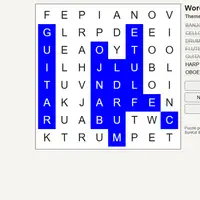
Word Search shows a grid of letters with a list of words beside it. Every word in the list is hidden somewhere in the grid, running across, down or diagonally, and it can be spelled forward or backward. Drag from the first letter of a word to the last to mark it. Find them all and the game tells you every word has been found. It was built by Bill (BunKat LLC) and Lucas-C.
The puzzle comes with themed word lists such as Animals, Kitchen, Weather, Space, Fruit, Music and Ocean, and the New word list button moves on to the next theme. You can also type in your own words, add extra ones, and build a fresh grid from them, which is handy for practicing spelling or vocabulary lists from class. If you get stuck, Solve Puzzle reveals the rest. It suits players who want a calm puzzle with no timer.
How to play Word Search
- Press on the first letter and drag to the last - select a word
- Touch the first letter and slide to the last - select a word on touch screens
- New word list - switch to the next themed word list
- New grid with these words - make a new grid from the words shown
- Type in a word box or click Add word - add or change a word
- Solve Puzzle - reveal the remaining words
Playing Word Search on a computer
Find a word from the list in the grid, then press on its first letter and drag to its last letter to mark it. Click New word list for a different theme, or type your own words and click New grid with these words. Click Solve Puzzle if you want to see the answers. Scan row by row for each word's first letter.
Playing Word Search on a phone or tablet
Word Search works with touch. Touch the first letter of a word and slide your finger to the last letter to mark it. The buttons for new lists, new grids and solving are all tappable, and the layout adjusts to smaller screens. Typing your own words works too, using your phone's keyboard.
Tips and tricks
- Scan for uncommon letters like Z, Q, K or V first; they stand out and lead you to words fast.
- Remember words can run backward and diagonally, so check all eight directions around a starting letter.
- Look for the first two letters of a word side by side, then follow that direction.
- Type your own spelling or vocabulary words and click New grid with these words to make a custom practice puzzle.
Game details
| Developer | Bill (BunKat LLC) and Lucas-C |
|---|---|
| Category | Puzzle Casual |
| Platform | Desktop and mobile |
| Technology | HTML5 (open source) |
| Price | Free |
| Original game | bunkat/wordfind by Bill (BunKat LLC) and Lucas-C |
| Code license | MIT |
| Art and sound | MIT (HTML and CSS only, no image or audio assets; bundled jQuery 1.7.1 under MIT) |
| Hosted copy | Adapted to run on GN Math - see the changes |
Word Search FAQ
Can I make a word search with my own words?
Yes. Edit the word boxes or click Add word, then click New grid with these words to build a puzzle from your list.
Can words go backward or diagonally?
Yes. Words can run in any of eight directions: across, down, diagonally, and backward in each of those.
Does Word Search work on phones and Chromebooks?
Yes. On a touch screen, touch the first letter and slide to the last; on a Chromebook, press and drag with the mouse or touchpad.