
About Tiny Synth Piano
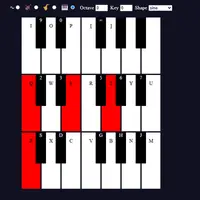
Tiny Synth Piano is not a game you win; it is a playable keyboard in your browser. Three rows of piano keys appear on screen, and each row is one octave. You can play notes with your computer keyboard, click and hold keys with the mouse, or drag across them to slide through notes. It was built by Frank Force, starting from a tiny piano program written in a very small amount of code.
Above the keys are a few simple controls. Pick one of four voices, shown as small icons for organ, brass, strings and a plain sine tone. Change the wave shape between sine, square, sawtooth and triangle to make the sound smoother or buzzier, shift the octave up or down, and move the key to change pitch. Every sound is made live in your browser, and nothing is saved. It suits anyone who wants to pick out a tune, test a melody or just relax for a few minutes.
How to play Tiny Synth Piano
- Z S X D C V G B H N J M - play the lowest octave
- Q 2 W 3 E R 5 T 6 Y 7 U - play the middle octave
- I 9 O 0 P [ = ] - play the top octave
- Mouse: press and hold a key, or drag across keys - play notes
- Touch and hold a key - play a note
- Voice buttons, Shape menu, Octave and Key arrows - change the sound
Playing Tiny Synth Piano on a computer
Click once on the piano, then play the lowest octave with Z S X D C V G B H N J M and the middle octave with Q 2 W 3 E R 5 T 6 Y 7 U. You can also click and hold keys with the mouse. Pick a voice icon and a wave shape above the keys. Start with the sine voice to hear each note clearly.
Playing Tiny Synth Piano on a phone or tablet
Tiny Synth Piano responds to touch: press and hold a key to play it, and lift your finger to stop. The page uses a fixed layout, so on a phone the keys can be small or partly off screen and you may need to zoom or scroll. A tablet gives the three octaves more room.
On a phone right now? Try Coreball, 2048 and Word Search - they are built for touch screens.
Tips and tricks
- In the middle row, the letters play white notes and the numbers between them play the black notes, so the layout mirrors a real piano.
- Try the square or sawtooth shape with the brass voice for a retro video game sound.
- Use the Key arrows to shift a song into a range that fits your fingers better.
- Hold down several letter keys at once to play chords.
Game details
| Developer | Frank Force |
|---|---|
| Category | Casual Rhythm Sandbox |
| Platform | Desktop (needs a keyboard or mouse) |
| Technology | HTML5 (open source) |
| Price | Free |
| Original game | KilledByAPixel/1Keys by Frank Force |
| Code license | GPL-3.0 |
| Art and sound | GPL-3.0 (all sound synthesized with the Web Audio API, no image or audio files) |
| Hosted copy | Adapted to run on GN Math - see the changes · source code |
Tiny Synth Piano FAQ
Is Tiny Synth Piano a game with a score?
No. It is a free-play instrument with no goals or score; you just play music.
Can I play chords on Tiny Synth Piano?
Yes. Holding several keys at once plays all of those notes together.
Does Tiny Synth Piano work on a phone?
Partly. You can touch and hold keys, but the page has a fixed size that can be cramped or need scrolling on small screens.