
About Pixel Sketch Studio
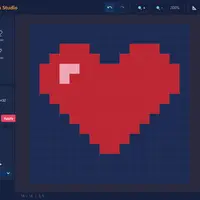
Pixel Sketch Studio is a creative toy rather than a game with goals, made by developer gitstq. You get a small grid canvas, from 8 by 8 up to 64 by 64 pixels, and a set of simple tools: pencil, eraser, fill bucket, color picker and a move tool for panning. Choose colors from swatches, try preset palettes such as Pastel, Neon, Earth and Retro Green, or mix a custom color.
The best part is animation. Add or duplicate frames and press Play to watch your sprite move at speeds from 2 to 24 frames per second. When you finish, export a single PNG or a sprite sheet with every frame side by side. Your work is not saved, though, so reloading the page clears the canvas, and exporting before you leave is a must. It suits students who like drawing, designing game characters or just sketching in pixels.
How to play Pixel Sketch Studio
- Click, drag or one-finger drag on the canvas - draw with the current tool
- P, E, G, I, V - pencil, eraser, fill, color picker, move
- Click a swatch (right-click or Ctrl+click for the second color) - set main or second color
- X - swap main and second color
- [ and ] - change brush size
- Ctrl+Z, Ctrl+Y, B, Ctrl+S - undo, redo, toggle grid, export
Playing Pixel Sketch Studio on a computer
Pick a canvas size, then click or drag on the grid to draw. Switch tools with P for pencil, E for eraser, G for fill, I for color picker and V for move. Left-click a swatch for your main color and right-click one for the second color, then press X to swap them. Use [ and ] for brush size, and press Ctrl+S to export your art.
Playing Pixel Sketch Studio on a phone or tablet
Pixel Sketch Studio partly works on phones. You can draw by tapping or dragging with one finger, and tap tools in the Tools panel. On narrow screens, though, the header buttons overflow and the color and brush panels turn into a scrolling strip under the canvas, which feels cramped. A tablet held sideways is much better, and a computer with a mouse is best.
On a phone right now? Try Coreball, 2048 and Word Search - they are built for touch screens.
Tips and tricks
- Press B to show the grid when placing single pixels. It makes lining things up much easier.
- Use the fill bucket (G) for large areas and the color picker (I) to grab a color already on the canvas.
- Duplicate a frame before changing it, so each step of an animation only needs small edits.
- Export with Ctrl+S before you close the tab, since the editor does not keep your drawing.
Game details
| Developer | gitstq |
|---|---|
| Category | Casual Sandbox |
| Platform | Desktop (needs a keyboard or mouse) |
| Technology | HTML5 (open source) |
| Price | Free |
| Original game | gitstq/PixelCraft by gitstq |
| Code license | MIT |
| Art and sound | MIT (interface icons are inline SVG in the code; no image, font or audio files) |
| Hosted copy | Adapted to run on GN Math - see the changes |
Pixel Sketch Studio FAQ
Is Pixel Sketch Studio a game?
Not exactly. There are no levels or scores. It is a drawing and animation tool for making pixel art.
Does Pixel Sketch Studio save my drawing?
No. Your drawing is lost when you reload or leave the page. Export it as a PNG or sprite sheet to keep it.
Can I use Pixel Sketch Studio on a phone?
Drawing with a finger works, but the buttons and panels are cramped on small screens. A tablet, laptop or Chromebook gives a much better experience.