

About Progress Knight
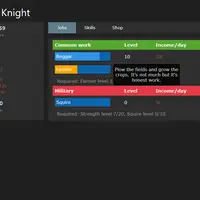
Progress Knight is an incremental game built by Ihtasham42. You start life at age 14 as a beggar with a lifespan of 70 years. Time passes on its own, and you pick one job to earn coins and one skill to study. Jobs climb through farming and trade, a military path toward knighthood, and a school of magic. Skills boost things like experience, pay, happiness and even lifespan.
Coins buy better homes and items, which raise happiness and speed up learning, but they also cost money each day. If your coins drop below zero, you lose your house and items. Later in life an amulet appears, and touching it lets you rebirth: you lose levels and coins but gain experience multipliers based on your best levels, so each new life moves faster. Much later, a second rebirth unlocks dark magic. Progress saves automatically, which makes this a good fit for players who enjoy watching numbers grow and planning long-term upgrades.
How to play Progress Knight
- Click or tap a progress bar - choose your current job or skill
- Click or tap a tab - switch between Jobs, Skills, Shop, Amulet and Settings
- Click or tap an item button - move to a home or toggle a shop item
- Click or tap "Pause" - pause or resume time
- Tick the sidebar checkboxes - turn on auto-promote or auto-learn
Playing Progress Knight on a computer
Click a job's progress bar to work it and a skill's bar to study it; the sidebar shows your age, coins and daily income. Use the Shop tab to pick a home and buy items, and tick auto-promote and auto-learn to save clicks. Pause stops time whenever you need to plan. Check the Amulet tab as your character ages, since that is where rebirth appears.
Playing Progress Knight on a phone or tablet
Progress Knight can be played with taps: tap progress bars to switch jobs or skills, tap tabs and shop items, and tap the checkboxes. The page uses a wide, fixed layout made for desktop screens, so on a phone the tables run off the edge and you will scroll sideways often. A tablet in landscape or a Chromebook is the more comfortable choice.
On a phone right now? Try Coreball, 2048 and Word Search - they are built for touch screens.
Tips and tricks
- Turn on auto-promote and auto-learn early so you move up to better jobs and skills without checking constantly.
- Keep an eye on Net/day; if it goes negative for too long you go broke and lose your home and items.
- Buy a Book early, since skill experience speeds up nearly everything else.
- Do not fear rebirth; the multipliers it gives make the next life much quicker.
Game details
| Developer | Ihtasham42 |
|---|---|
| Category | Casual Clicker Simulation |
| Platform | Desktop (needs a keyboard or mouse) |
| Technology | HTML5 (open source) |
| Price | Free |
| Original game | ihtasham42/progress-knight by Ihtasham42 |
| Code license | Unlicense |
| Art and sound | Public domain (text and CSS interface only, no image or audio files) |
| Hosted copy | Adapted to run on GN Math - see the changes |
Progress Knight FAQ
Does Progress Knight save my game?
Yes. It saves to your browser every few seconds. The Settings tab also lets you export a save code and import it later.
What does rebirth do?
Touching the amulet's eye restarts your life without your levels or coins, but every job and skill gains an experience multiplier based on the highest level you reached.
Does it work on phones?
Partly. Taps work, but the layout is built for wide screens, so on a phone you will need to scroll sideways to see everything.