

About Gomoku
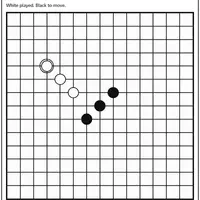
Gomoku is a five-in-a-row strategy game, built by Christopher Müller for his PaperGames collection. Players take turns placing a stone on an empty intersection of a 15x15 grid, with black always going first. Stones never move and are never captured. Make an unbroken line of five or more stones across, down or diagonally and you win at once. If the board fills up first, it is a draw.
The rules take a minute to learn, but good play is all about threats. A line of four with both ends open cannot be stopped, so each move balances building your own lines against blocking the other side. This version uses freestyle rules with no forbidden moves. You can play the computer on Easy, Medium or Hard and choose to be black or white, or play a friend on the same screen. Unfinished games are saved in your browser. It suits fans of short, thoughtful board games.
How to play Gomoku
- Click or tap an empty intersection - place a stone
- Arrow keys and Enter - move between points and place a stone
- 2 Player (local) - start a game for two people on one device
- vs Computer, pick a color and level, then New game - play the computer
- Undo - take back your last stone
- Resign - give up the current game
Playing Gomoku on a computer
Choose vs Computer, pick black or white and a level, then click New game, or choose 2 Player (local) to play a friend. Click any empty intersection to place your stone. Keyboard players can move with the arrow keys and press Enter to place. Undo takes back a stone and Resign ends the game. Tip: block open threes before they turn into fours.
Playing Gomoku on a phone or tablet
Gomoku plays well on phones and tablets. Tap your mode, tap New game, then tap an empty intersection to place a stone. The grid has 15 lines each way, so the points are close together on a small screen; take a moment to tap the exact spot, and use Undo if a stone lands one point off.
Tips and tricks
- Block any line of three that has open space on both ends; once it grows into an open four, it cannot be stopped.
- Look for a stone that creates two threats at once, such as a three and a four, so the other player can only block one.
- Start near the center, where lines have room to grow in every direction.
- Pick black if you want the first move, which gives you the opening initiative.
Game details
| Developer | Christopher Müller |
|---|---|
| Category | Card & Board Strategy 2 Player |
| Platform | Desktop and mobile |
| Technology | HTML5 (open source) |
| Price | Free |
| Original game | YourChaosChris/PaperGames by Christopher Müller |
| Code license | MIT |
| Art and sound | MIT (grid and stones drawn with CSS, no image or audio files) |
| Hosted copy | Adapted to run on GN Math - see the changes |
Gomoku FAQ
How do you win at Gomoku?
Place five or more of your stones in a straight, unbroken line across, down or diagonally. A full board with no line of five is a draw.
Can two people play Gomoku together?
Yes. Choose 2 Player (local) and take turns placing stones on the same device.
Does the computer have difficulty levels?
Yes. You can pick Easy, Medium or Hard, and choose whether you play black or white.