


About Logic Mines
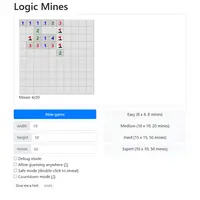
Logic Mines is a grid puzzle by Paweł Marczewski. Each square you reveal shows how many mines touch it, and you use those numbers to work out which squares are safe and which to flag. Reveal every safe square to win; open a mine and you lose.
What sets it apart is how mines are placed. They are not decided at the start. Instead, the game figures them out as you play, and if you guess when a safe move was available, it picks the worst outcome for you. But when there is truly no safe square left anywhere, any guess next to the revealed area is safe. That makes every board solvable by careful logic. There are four presets from Easy (8 by 8, 8 mines) to Expert (10 by 10, 50 mines), plus custom sizes, a hint button, undo, and optional safe and countdown modes. It suits puzzle fans who want pure reasoning rather than luck.
How to play Logic Mines
- Left-click or tap - reveal a square
- Right-click - cycle flag, question mark, blank
- Press and hold for half a second - cycle flag (touch)
- Double-click or middle-click a number - open all its neighbors once its mines are flagged
- Click or tap "New game" - start a new board
Playing Logic Mines on a computer
Choose a preset such as Easy or Medium and click New game. Left-click a square to reveal it and right-click to cycle through a flag, a question mark and blank. Double-click or middle-click a number once its mines are flagged to open the rest around it. Turn on safe mode if you want reveals to need a double-click, which helps prevent accidental clicks.
Playing Logic Mines on a phone or tablet
Logic Mines is fully playable on touch screens. Tap a square to reveal it, and press and hold for about half a second to cycle a flag or question mark. The double-click shortcut for opening a number's neighbors is a mouse feature, so on a phone you reveal those squares one tap at a time. The Easy board is the most comfortable size on a small screen.
Tips and tricks
- Never guess while the board still has a square you can prove is safe; the game will put a mine there.
- Use Give me a hint when stuck; it tells you whether safe squares exist or whether a guess is allowed.
- Flag mines as you find them, then double-click a satisfied number to clear its neighbors in one move.
- Turn on Countdown mode if you like seeing how many mines each number still needs after your flags.
Game details
| Developer | Paweł Marczewski |
|---|---|
| Category | Puzzle |
| Platform | Desktop and mobile |
| Technology | HTML5 (open source) |
| Price | Free |
| Original game | pwmarcz/kaboom by Paweł Marczewski |
| Code license | MIT |
| Art and sound | MIT (the author's own SVG sprites; Bootstrap 4.3.1 and long-press-event, both MIT) |
| Hosted copy | Adapted to run on GN Math - see the changes |
Logic Mines FAQ
Is every Logic Mines board solvable without luck?
Yes. If a safe move exists, logic can find it, and when none exists, guessing on a square next to the revealed area is always safe.
Does Logic Mines work on phones?
Yes. Tap to reveal a square and press and hold for half a second to place a flag.
Can I undo a mistake?
Yes. The Undo button steps back your last move, and Give me a hint explains what kind of move is available.