



About Arcade GP
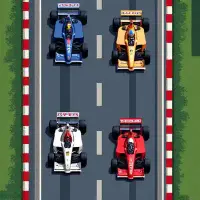
Arcade GP looks like an old-school top-down racer, but it borrows the strategy side of real Formula 1. You race against computer drivers, and your tires wear as the laps go by, so pushing too hard early can leave you sliding around at the end.
Grand Prix races add pit stops with a quick minigame in which you press the key for each wheel to swap tires fast. An ERS overtake boost gives you extra speed for passing. Deciding when to pit and when to spend the boost turns every race into a string of small tactical calls, and there are touch controls for phones held in landscape.
How to play Arcade GP
- W to go, Shift to brake
- A and D - steer
- Enter - fire the ERS boost
- P - pit stop, then 7, 9, 1 and 3 for each tire
Playing Arcade GP on a computer
Arcade GP blends a top-down racer with Formula 1 strategy. Once Play now and PLAY have loaded the grid, press W to accelerate, Shift to brake and A and D to steer. Enter fires the ERS overtake boost, R resets and C switches the camera. In a Grand Prix, P calls a pit stop, where 7, 9, 1 and 3 change each tire. Go easy on your tires early in the race.
Playing Arcade GP on a phone or tablet
Arcade GP has full touch controls: on-screen steering, a throttle slider, and buttons for pit stops and the overtake boost. Landscape is required, so rotate your phone before the race starts. Tires wear as the laps go by, so ease off the throttle slider through corners instead of keeping it maxed, and save the overtake button for straights.
Tips and tricks
- Drive smoothly in the opening laps to save tire life for later.
- Learn the numpad layout of the pit minigame so stops stay short.
- Use the overtake boost on straights where a pass is realistic.
Game details
| Category | Racing Strategy |
|---|---|
| Platform | Desktop and mobile |
| Technology | HTML5 |
| Price | Free |
Arcade GP FAQ
Does Arcade GP have pit stops?
Yes. In Grand Prix mode you press P to pit, then complete a short minigame for each tire.
Can you play Arcade GP on a phone?
Touch play is supported: you steer with on-screen controls, use a slider for throttle and hold the phone in landscape.