About Can't Get Back
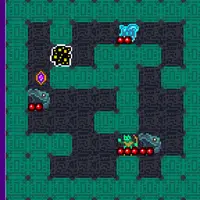
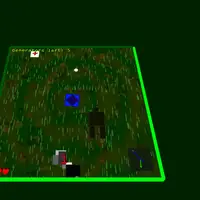
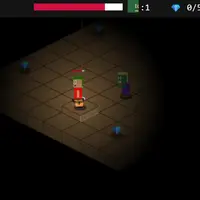
Can't Get Back is a top-down adventure made by Kipkat for the js13k game jam, where every entry has to fit in 13 kilobytes. The story is short and strange: you are trapped in a maze, and the only way home is to turn on a set of generators in order. That powers a bomb that will break the world apart. The catch is that everything disappears as you pass by it.
You roam the map with the arrow keys, fire in four directions with W, A, S and D, and press E at generators, healing spots, totems and pickups. Squares chase you and take a heart when they touch you. A small radar in the corner points out nearby objects. After each full set of generators, a new round begins with one more generator, one more heart and quicker music. It suits players who like tense, simple shooters with a mysterious mood.
How to play Can't Get Back
- Space - start the game, or restart after dying
- Arrow keys - move
- W, A, S, D - shoot up, left, down or right
- E - use a generator, healing spot, totem or pickup
- M - mute the music (after the current loop)
- L - low-detail mode for slow devices
Playing Can't Get Back on a computer
Press Space to start, then let the short story scroll past. Steer with the arrow keys and shoot with W, A, S and D, one key for each direction. Walk up to a generator or pickup and press E to use it. Press M to mute the music or L for lower detail. Keep moving while you fire, since standing still lets the squares close in on you.
Playing Can't Get Back on a phone or tablet
Can't Get Back needs a physical keyboard. It has no touch controls, so it will not respond to taps on a phone or tablet. Play it on a laptop, desktop or Chromebook with a keyboard instead. If you are on a phone right now, look for games labeled 'Desktop and mobile', which are built to work with touch screens.
On a phone right now? Try Brick Smash, Protektor and City Shield - they are built for touch screens.
Tips and tricks
- Move with one hand and shoot with the other. Since arrows steer and W, A, S and D fire, you can back away from a square while still hitting it.
- Press E at a totem when you are in trouble. While you pray, your hearts are held steady for a short time.
- Grab SPD and heart pickups when you see them, because the rounds get harder and every extra edge helps.
- If the game stutters on an older Chromebook, press L to switch to low-detail mode.
Game details
| Developer | Kipkat |
|---|---|
| Category | Adventure Shooting Action |
| Platform | Desktop (needs a keyboard or mouse) |
| Technology | HTML5 (open source) |
| Price | Free |
| Original game | js13kGames/cant-get-back by Kipkat |
| Code license | MIT |
| Art and sound | MIT (graphics drawn in code, ZzFX sound effects and music generated in code) |
| Hosted copy | Adapted to run on GN Math - see the changes |
Can't Get Back FAQ
Does Can't Get Back have an ending?
There is no final win screen. After each set of generators, a harder round starts with one more generator, so the goal is to see how far you can go.
Can I play Can't Get Back on a phone or tablet?
No. It needs a keyboard for moving and shooting and has no touch controls. It runs fine on Chromebooks and laptops with a keyboard.
Does Can't Get Back save my progress?
No. Nothing is saved, so refreshing or leaving the page starts you over. When you die, press Space to try again.