
About Hue Jumper
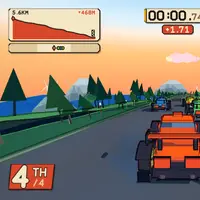
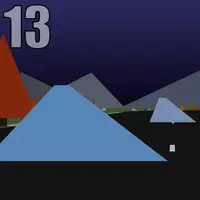
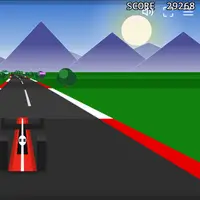
Hue Jumper is a retro-style 3D driving game made by Frank Force, originally squeezed into just 2 kilobytes of code. You race along a randomly generated road through hills, trees and rocks, under a sky with a sun and moon. A timer counts down in one corner and your distance climbs in the other. When the timer hits zero, the run is over.
Every checkpoint you pass adds 10 seconds and shifts the colors of the whole world, which is where the name comes from. The road gets harder the farther you go, with sharper turns and trickier hills. Driving off the pavement slows you down, and hitting trees or rocks costs speed, so staying on the road matters. Double-clicking makes the car jump, which can help over bumps and hazards. Each run is a new road, which makes Hue Jumper a good fit for players who like quick, replayable distance challenges.
How to play Hue Jumper
- Click the game screen - start driving
- Move the mouse left or right - steer
- Hold the mouse button - brake
- Double-click - jump
- Hold a finger on the left or right side - steer (touch)
- R - restart on a new road
Playing Hue Jumper on a computer
Click the screen to start; the game takes over your mouse pointer so you can steer by moving left and right. Hold the mouse button to brake and double-click to jump. Press R to restart on a new road and press 1 to save a screenshot. Press Esc to get your pointer back. When your cursor is released the car brakes, so click the screen again to keep driving.
Playing Hue Jumper on a phone or tablet
Hue Jumper does work on touch screens: touch the screen to start, hold a finger on the side you want to steer toward, lift your finger to brake, and tap quickly to jump. Two things are awkward on phones: there is no touch button to restart, since that uses the R key, and the small screen makes the road ahead harder to read. Landscape mode helps.
On a phone right now? Try Coreball, Hextris and Tiny Track Racer - they are built for touch screens.
Tips and tricks
- Keep the brake light; holding the mouse button too long eats into the time you need to reach the next checkpoint.
- Stay on the paved road, since the car slows down and bounces when its wheels are in the grass.
- Make small mouse movements when steering, because big swings send the car sliding toward the edge on curves.
- If a run starts badly, press R to try a fresh road right away.
Game details
| Developer | Frank Force |
|---|---|
| Category | Racing Arcade |
| Platform | Desktop (needs a keyboard or mouse) |
| Technology | HTML5 (open source) |
| Price | Free |
| Original game | KilledByAPixel/HueJumper2k by Frank Force |
| Code license | GPL-3.0 |
| Art and sound | GPL-3.0 (no asset files; all graphics drawn with canvas code, no audio) |
| Hosted copy | Unmodified |
Hue Jumper FAQ
How do I get more time in Hue Jumper?
Drive through a checkpoint. Each one adds 10 seconds, up to a maximum of 20 on the clock.
Is there a goal or an end?
The road is endless. The aim is to go as far as possible, and your distance is shown on the right of the screen.
Does it save my best distance?
No. Hue Jumper does not keep a record between runs. Pressing 1 saves a screenshot to your device if you want to remember a good one.